
A rewarded ad is a full screen video or interactive unit that a visitor chooses to watch in exchange for something on your site, such as unlocked content, an extra download link, or a bonus feature. Unlike display banners that load automatically, rewarded adsense units only play when a user opts in, which is why completion rates and CPMs for this format tend to run higher than standard placements. For a rewarded ads website, this creates a second revenue layer that does not compete for the same screen space as your existing banners. The catch is that Google treats this ad type as a premium feature, so the setup process is stricter than adding a normal display unit.

Step 1: Confirm Your Site Meets the Eligibility Bar
Before touching any code, check that your AdSense account is in good standing with no recent policy violations. Rewarded ad units are generally rolled out to publishers who already run AdSense on a mobile web property with steady traffic, since this format performs best on phones and tablets. Log into your AdSense dashboard, go to Ads, then Ad units, and look for a Rewarded ads option under By ad type. If the option is missing, your account likely has not been enabled for this feature yet, and you can request access through AdSense support while continuing with your existing ad setup.
Step 2: Turn On Rewarded Ads Inside Your AdSense Account
Once the feature appears, click Create new ad unit and select Rewarded. Name the unit something you can identify later, such as ArticleUnlock or BonusContent, since you may end up running several rewarded placements across different pages. AdSense will generate a snippet of JavaScript for this unit. This is the core of every adsense rewarded ad setup: the code itself does nothing until it is triggered by a user action on your page, which you configure in the next step.
Step 3: Decide Where Rewarded Ads Fit on Your Pages
Placement decides whether this format helps or hurts user experience. Common spots on a rewarded ads website include unlocking a downloadable PDF, skipping a countdown timer on a resource page, or revealing a hidden section of a long guide. Avoid placing the trigger somewhere it blocks a visitor from reading your main content for free, since Google's policies require that rewarded ads stay optional. The reward should be a genuine bonus, not a paywall disguised as one.
Step 4: Insert the Ad Unit Code and Connect the Trigger
Paste the generated ad code into your site's HTML, ideally inside the section of the page where the bonus content will appear. Then write a short script that calls the rewarded ad function when a visitor clicks your chosen button, for example an Unlock Bonus Content link. The AdSense documentation provides the exact JavaScript method names for loading and showing the ad, and most CMS platforms let you paste this into a custom HTML block without touching your theme files.
Step 5: Test the Unit in a Sandbox Before Publishing
Google provides test ad units specifically so you can confirm the reward flow works without risking policy strikes from real ad requests during testing. Click through the entire journey yourself: trigger the ad, watch or skip it, and confirm the reward actually unlocks. Check this on both mobile and desktop, since a rewarded ads publisher who only tests on desktop often finds mobile playback issues after launch. Only switch to your live ad unit ID once the test version behaves correctly on every device you support.
Step 6: Keep Reward Triggers Inside Google's Policy Lines
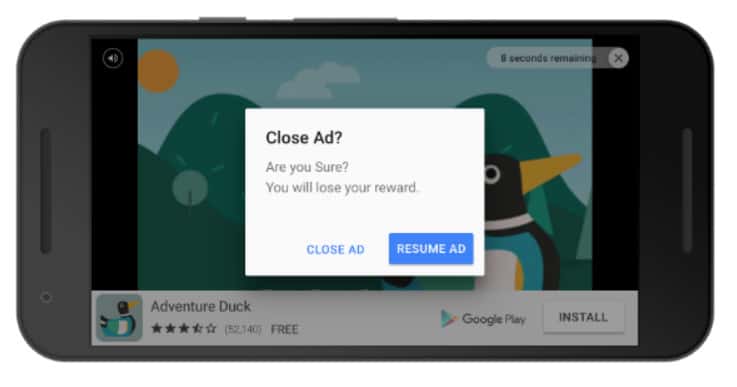
This is where many sites lose their rewarded ad access. Google rewarded ads must never be forced, meaning a visitor should always have a free path to your core content even if it takes a few extra clicks. Do not stack multiple rewarded units on a single page, and do not word your call to action in a way that implies the user must watch the ad to proceed, since that language can read as coercive under AdSense program policies. Keep the reward proportional too. A thirty second video for a small bonus feels fair, while the same ad length gating your entire article does not.
Step 7: Track Performance and Expand Gradually
After a week of live data, compare your rewarded unit's RPM against your standard display ads inside the AdSense reports tab. A healthy rewarded ads website typically sees a completion rate above sixty percent when the reward is genuinely valuable to the visitor. If numbers look weak, the usual fix is the offer itself rather than the ad code, so test a different bonus before assuming the ad type does not work for your niche. Once one page performs well, replicate the same reward structure on similar pages rather than inventing a new mechanic each time.
Mistakes That Get Rewarded Ad Access Revoked
The most common issue is treating the reward as mandatory rather than optional, which violates the spirit of the format even if the code technically allows a skip. A second issue is running rewarded units on pages with thin or duplicate content, since Google reviews the full page quality, not just the ad placement. A third mistake is misleading labeling, such as calling the unit a required step instead of a bonus. Any of these can lead to the rewarded ad feature being pulled from an account even while regular display ads keep running normally.
Bringing It Together
Setting up rewarded ads is less about the code snippet and more about designing a reward your visitors actually want. The technical side of an adsense rewarded ad setup takes minutes once your account is eligible, but the placement and offer decide whether the format adds real revenue or just adds friction. Start with one well tested placement, measure completion rate honestly, and expand only once that first unit proves the reward is worth a visitor's time.

