Finding a message in your AdSense account that says ad serving is currently limited is one of the most disorienting experiences a publisher can have, because the notice is vague about what triggered it, silent about how long it will last, and offers no clear instructions for resolving it. Revenue drops immediately and visibly. The account dashboard shows the limit notice but gives nothing specific to act on.
The good news is that the ad serving limit is not an account suspension, and it is not the same as a ban. Your AdSense account remains active, and you can still access your dashboard and monitor activity. The limit reduces the number of ads shown on your site while Google evaluates your traffic, but the account itself is not at risk of closure at this stage.
The more useful news is that the limit follows a lifecycle with known phases, a documented typical duration, and specific actions that affect how quickly it resolves. Understanding that lifecycle is what converts a disorienting wait into a structured recovery process.
The Two Types of Ad Serving Limit and Why the Distinction Matters
There are two reasons why Google might place ad serving limits on an AdSense account, and the one that applies to your account will be shown under "Issues" alongside the account status notice.
Type 1: Account Being Assessed
Ad serving on your account is being temporarily limited while Google assesses your traffic quality.
This is the most common restriction, especially for new AdSense accounts, new websites, and sites with sudden traffic spikes. When your account is being assessed, Google is reviewing the quality of your traffic and user behavior. Your account is under automated review, ads may appear less frequently, no specific timeframe is provided, and the restriction is lifted automatically once Google trusts your traffic.
The account being assessed limit is a precautionary flag, not an accusation. It means Google's system has noticed something that does not yet fit its established patterns for your account and wants to observe more traffic before restoring full ad serving. This type of limit is more common than most publishers realize and resolves without requiring any appeal process.
Type 2: Invalid Traffic Concerns
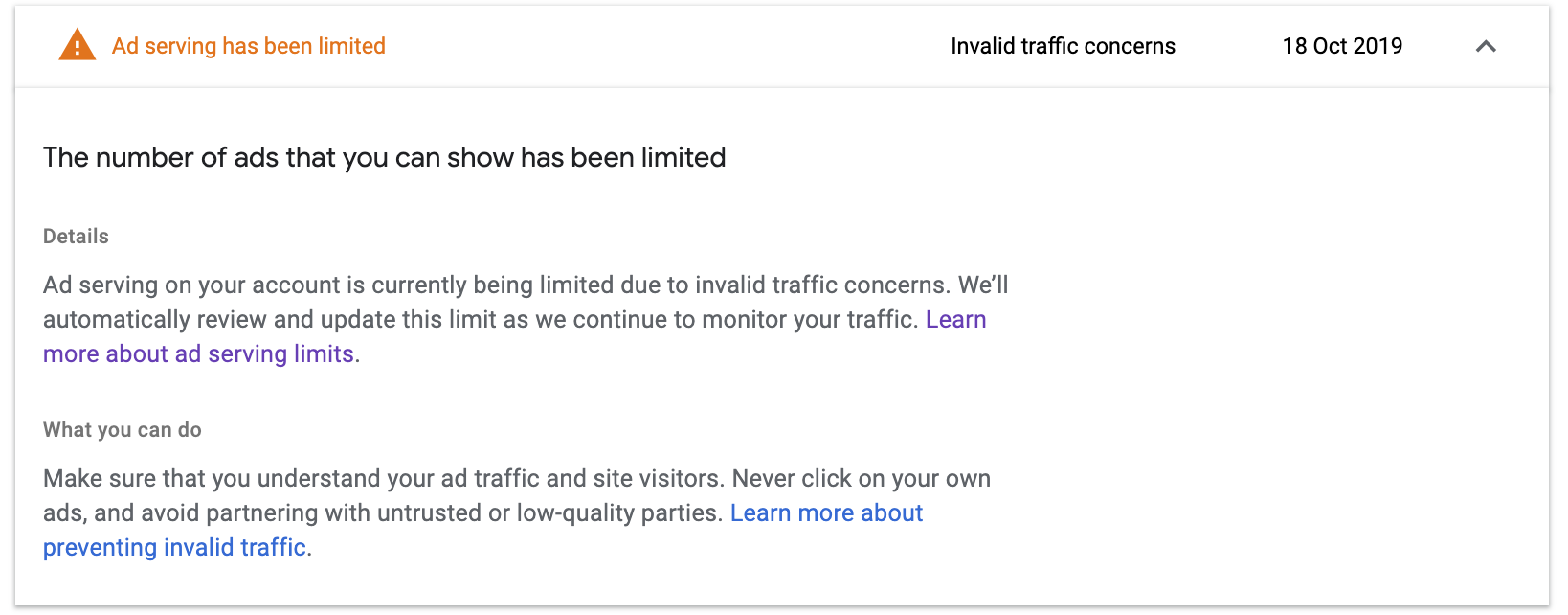
Ad serving on your account is currently being limited due to invalid traffic concerns. Google will automatically review and update this limit as it continues to monitor your traffic.
This type is a more significant signal. It means Google's detection system has identified specific patterns in your traffic that raise concerns about authenticity, not just unfamiliarity. The invalid traffic concerns limit typically takes longer to resolve than the assessment limit and may require active investigation on your part rather than passive waiting.
Checking which message appears in your Policy Center is the first practical step because the correct response differs between the two types. An account being assessed primarily needs time and clean traffic. An invalid traffic concerns limit needs investigation and remediation.
How Long Does the AdSense Ad Serving Limit Last?
This is the question every affected publisher asks, and the honest answer has two components: what Google's official guidance says, and what the practical experience of the limit resolution actually looks like.
What Google confirms:
While this ad serving limit typically impacts publishers for less than 30 days, it may take longer in some cases.
Google automatically reviews and updates the ad serving limit on an account as it monitors and evaluates the traffic. If issues are detected after lifting a limit or if there is no longer sufficient information to evaluate, the limit may be reinstated while evaluation continues.
What the practical timeline looks like:
In 2026, most limits last between 10 and 30 days. However, if the traffic quality does not improve, it can extend further.
For a new account traffic review, the typical duration is one to four weeks.
The vast majority of cases seem to resolve on their own within two to four weeks without any additional steps being taken by the publisher.
One publisher's documented experience provides useful reference: within a couple of days of the limit being placed, a few ads started showing up and revenue was around 10 percent of normal. In seven days it was back to normal. The alert was gone and revenue was coming in again. This represents a faster-than-average resolution, but it illustrates the partial recovery pattern: revenue does not snap from zero to full immediately. It typically rises gradually as Google's system processes more clean traffic data from the account.
The important nuance is that the 30-day figure is a typical ceiling, not a guarantee. AdSense does not provide a timeline on how long the review process will be. Publishers who have genuine invalid traffic concerns embedded in their traffic sources and who do not address those sources can remain limited beyond 30 days.
What the System Is Actually Evaluating During the Limit
Understanding what Google is looking for during the assessment period is what makes the difference between productive waiting and effective action.
The Policy Center represents a direct line to Google's compliance engine. When a limit is placed, it means your site is in an observation period. The systems are looking for engagement signals. They want to see that users are actually reading your content, scrolling naturally, and not just clicking ads randomly.
This is the critical insight for publishers in the assessment phase: the limit is lifted when Google's automated system sees enough clean, authentic traffic data to satisfy its evaluation threshold. Every session of genuine user traffic that arrives and engages naturally with your content is data that moves toward resolution. Every session of low-quality, bot, or incentivized traffic that arrives during the assessment period extends it.
One counterintuitive point that Google's guidance makes explicit: removing your ad units while under the limit will not make it go away faster. Keep your ad units in place. The system needs to see clean data flowing through them to verify that the traffic issue has been resolved.
Publishers who remove ads in response to a limit, thinking it will protect them, actually deprive the system of the traffic data it needs to complete its evaluation. The ads should remain in place throughout the limit period.

The Actions That Actually Affect Resolution Speed
The difference between a seven-day resolution and a thirty-plus day resolution is almost always a function of what the publisher does with the traffic sources that are flowing to their site during the assessment period.
Identify and pause any non-organic traffic sources immediately
Any paid traffic, social promotion, push notification campaign, or third-party traffic source that was running when the limit appeared should be paused immediately. These sources do not need to be permanent removals. They need to be paused long enough for the assessment period to run on clean organic traffic. Attempting to maintain paid traffic campaigns while under an ad serving limit adds noise to the evaluation signal that Google needs to clear the account.
Block known bot and data center IP ranges
Use your hosting control panel, Cloudflare, or your site's security settings to block traffic from known data center IP ranges and bot sources. Google Analytics with bot filtering enabled helps identify which sessions are non-human. Reducing the proportion of bot sessions that touch your ad units during the assessment period directly improves the quality signal Google receives.
Review your ad placement for accidental click triggers
Ad units placed adjacent to navigation elements, download buttons, or interactive page components generate accidental click patterns that extend an invalid traffic concerns limit. Review your current placement against Google's ad placement policies and move any units that sit within the high-accidental-click zones. A placement review conducted during the limit period may be the specific remediation that tips the evaluation toward resolution.
Do not click your own ads under any circumstances
This applies always, but it is especially critical during an assessment period. A publisher self-click during active account evaluation is a confirmation of the very signal Google is investigating. Do not visit your own site on devices that are not filtered from your AdSense reporting, and do not click any ad unit on any device for any reason during the limit period.
Monitor your Policy Center daily
Your account is still fully accessible and you can view details about the account-level issue in the Policy Center. Check the Policy Center notification daily for any change in status, any additional information about the specific concern flagged, or any update to the limit status. A change in the Policy Center message is the earliest indicator of resolution, often appearing before the account returns to full ad serving.
When the Limit Does Not Lift: The Escalation Risk
If issues are detected after lifting a limit or if there is no longer sufficient information to evaluate, Google may need to reinstate the limit while evaluating further.
A reinstated limit after an initial resolution is a signal that the underlying traffic quality issue was not fully resolved before the first limit lifted. It means the traffic source or pattern that triggered the original limit is still present. A reinstated limit is also a warning that the account is one further violation away from the escalation that can convert a limit into a suspension.
Publishers who receive a reinstated limit should treat it with the urgency of a warning rather than the patience of an assessment. The appropriate response is a deeper audit of every traffic source, including sources that were not paused during the first limit period, and a documented set of remediation actions that can be presented in a Policy Center appeal if the limit does not resolve automatically within a standard timeframe.
Showing that you have taken serious measures against combatting invalid traffic may improve your chances of getting the limitation lifted. Provide as much detail as possible in any appeal and highlight all the steps you have taken to avoid the same issue from happening again.
The ad serving limit is recoverable. The key is treating the assessment period as an active investigation rather than a passive wait, and ensuring that the traffic flowing to your site during that period is the cleanest, most authentic traffic your account has ever seen.

